> For the complete documentation index, see [llms.txt](https://help.listly.io/llms.txt). Markdown versions of documentation pages are available by appending `.md` to page URLs; this page is available as [Markdown](https://help.listly.io/docs/es/getting-started/extension-features/parts-options.md). Agents can also search and read this documentation through its [MCP server](https://help.listly.io/~gitbook/mcp).
# Opciones de Extraer parte
{% hint style="success" %}
[**¿Qué es Extraer parte?**](https://help.listly.io/docs/es/~/revisions/y8WKBfas9TOYO1YJEnUQ/getting-started/extension-features/parts)
Es una función que te permite **seleccionar y extraer parcialmente solo las áreas deseadas**. Úsala cuando desees mejorar la organización y precisión de los datos extraídos.
{% endhint %}
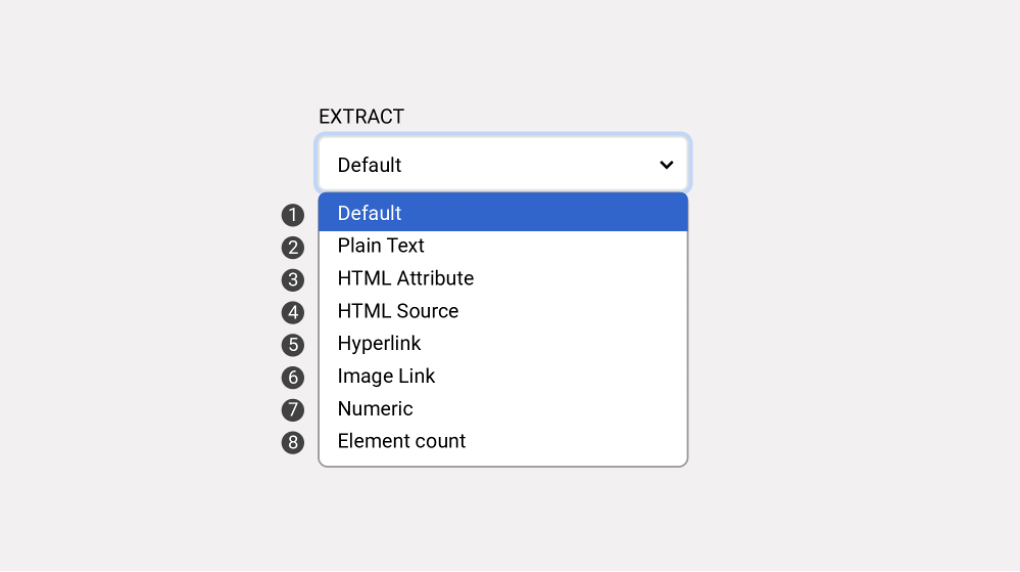
> Al realizar extracción parcial, puedes especificar en detalle los datos a extraer del área seleccionada utilizando las opciones de extracción del panel de partes.
{% stepper %}
{% step %}
### Predeterminado (Default)
Extrae la información proporcionada por defecto tal como está, incluyendo texto, URL de imágenes, hipervínculos, etc. En la mayoría de los casos, el valor predeterminado es suficiente.
{% endstep %}
{% step %}
### Texto Simple (Plain Text)
Solo extrae texto, excluyendo enlaces o URLs de imágenes.
{% hint style="info" %}
Ejemplo: Al seleccionar una imagen, no hay valor de extracción
{% endhint %}
{% endstep %}
{% step %}
### Atributo HTML (HTML Attribute)
Extrae el valor del atributo asignado al elemento. Es útil cuando la ruta de la imagen o información del producto está almacenada en atributos, y requiere conocimientos básicos de desarrollo para su uso.
{% hint style="info" %}
Ejemplo: class="style-1", data-id="id-1"
{% endhint %}
{% endstep %}
{% step %}
### Fuente HTML (HTML Source)
Extrae el código HTML del elemento seleccionado tal como está. Se utiliza cuando los desarrolladores necesitan procesar el código posteriormente.
{% endstep %}
{% step %}
### Hipervínculo (Hyperlink)
Solo extrae los hipervínculos adjuntos a texto, imágenes, etc.
{% endstep %}
{% step %}
### Enlace de Imagen (Image Link)
Solo extrae URLs de imágenes.
{% endstep %}
{% step %}
### Numérico (Numeric)
Solo extrae números dentro del área seleccionada.
{% hint style="info" %}
Ejemplo: Precio especial con descuento 5,000 pesos → 5,000
{% endhint %}
{% endstep %}
{% step %}
### Recuento de Elementos (Element Count)
Devuelve el número de elementos seleccionados como un número.
{% hint style="info" %}
Ejemplo: 36 elementos seleccionados → 36
{% endhint %}
{% endstep %}
{% endstepper %}
---
# Agent Instructions
This documentation is published with GitBook. GitBook is the documentation platform designed so that both humans and AI agents can read, navigate, and reason over technical content effectively. Learn more at gitbook.com.
## Querying This Documentation
If you need additional information that is not directly available in this page, you can query the documentation by asking a question.
Perform an HTTP GET request on the following URL with the `ask` and `goal` query parameters:
```
GET https://help.listly.io/docs/es/getting-started/extension-features/parts-options.md?ask=&goal=
```
`ask` is the immediate question: it should be specific, self-contained, and written in natural language.
`goal` is what the user is ultimately trying to achieve, the reason they need the answer. Sharing it helps GitBook give you a better, more relevant answer. A goal is most helpful when it describes the outcome the user wants rather than restating the question. For example, with `ask=how do I create an API token`, a goal like `automate deployments from our CI pipeline` lets GitBook tailor the answer to that use case.
The response will contain a direct answer to the question and relevant excerpts and sources from the documentation.
Use this mechanism when the answer is not explicitly present in the current page, you need clarification or additional context, or you want to retrieve related documentation sections.