> For the complete documentation index, see [llms.txt](https://help.listly.io/llms.txt). Markdown versions of documentation pages are available by appending `.md` to page URLs; this page is available as [Markdown](https://help.listly.io/docs/ja/getting-started/enterprise-solutions/fail-fast.md).
# 高速失敗
## フェイルファスト戦略とは?
大規模データ収集では、ネットワーク遅延、ブロッキング、異常応答などにより、収集タスクが長時間停滞したり、非効率的に待機することがあります。
Listly Enterpriseは、これらの問題を最小限に抑えるため、データ収集機能に\*\*「フェイルファスト戦略」\*\*を適用しています。
「フェイルファスト」機能を使用すると、グループ抽出中に一定の割合または数の失敗が検出された場合、グループ内の残りのすべてのタスクを停止し、次のタスクに移動するようシステムを設定できます。
***
## 使い方
{% stepper %}
{% step %}
#### ソースページを抽出後、\[+グループ]ボタンをクリック
**この機能は**[**グループ抽出**](https://help.listly.io/docs/ja/~/revisions/BRSLbUB6NrSu5yrQZiRv/getting-started/result-page-features/group-extraction)**タスク作成過程で設定できます。** ソースページを抽出後、結果ページ上部の **\[+グループ]** ボタンをクリックします。
{% endstep %}
{% step %}
#### 新しいグループにURLを入力後、フェイルファストオプションを設定
**新しいグループにURLを入力後、フェイルファストオプションを設定します。**
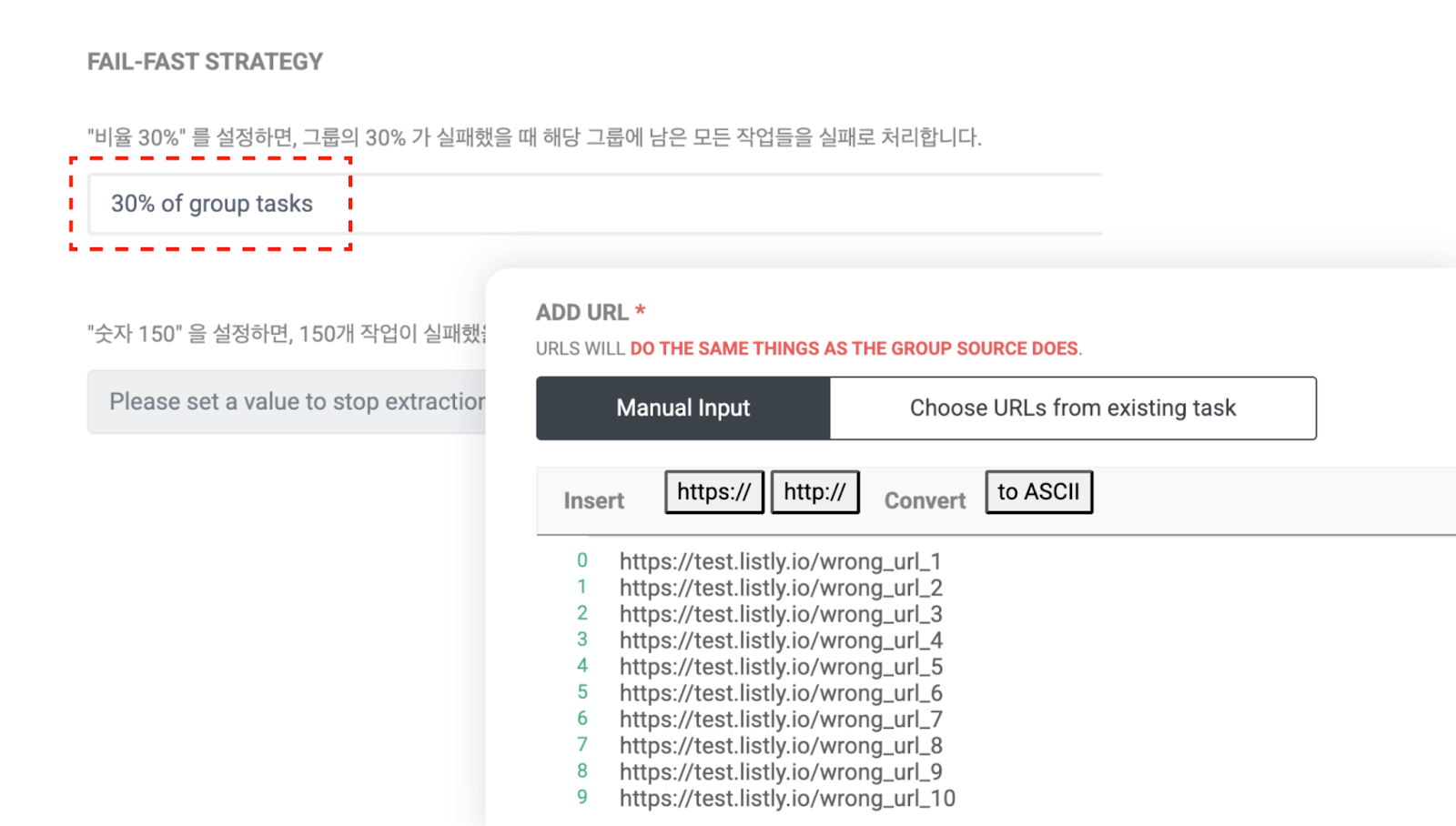
➊ パーセンテージ設定:選択したパーセンテージでタスクが失敗すると、残りのタスクは失敗としてマークされます。
➋ カウント設定:入力したカウント数でタスクが失敗すると、残りのタスクは失敗としてマークされます。
テストのため、パーセンテージを30%に設定し、10個のURLを入力してグループを作成しました。失敗シナリオをシミュレートするため、意図的に間違ったURLを入力しました。
{% endstep %}
{% step %}
#### タスクの進行状況を確認
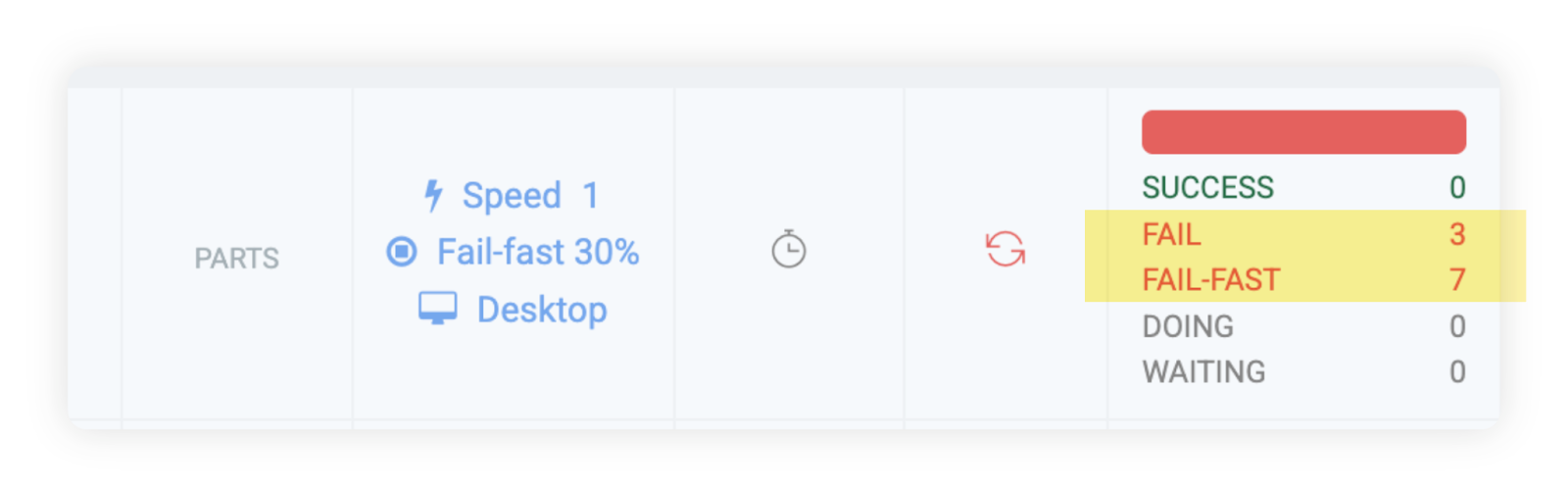
以下は例の結果画面です。30%(10個のURLのうち3個)で抽出が失敗した場合、残りの7つのタスクが自動的にフェイルファスト処理されたことが確認できます。
このようにフェイルファスト機能を活用することで、特定の状況での不要な待機時間を削減し、**全体的なプロセス時間を大幅に短縮**できます。
{% endstep %}
{% endstepper %}
---
# Agent Instructions
This documentation is published with GitBook. GitBook is the documentation platform designed so that both humans and AI agents can read, navigate, and reason over technical content effectively. Learn more at gitbook.com.
## Querying This Documentation
If you need additional information that is not directly available in this page, you can query the documentation dynamically by asking a question.
Perform an HTTP GET request on the current page URL with the `ask` query parameter, and the optional `goal` query parameter:
```
GET https://help.listly.io/docs/ja/getting-started/enterprise-solutions/fail-fast.md?ask=&goal=
```
`ask` is the immediate question: it should be specific, self-contained, and written in natural language.
`goal` is optional and describes the broader end goal you are ultimately trying to accomplish on behalf of the user. GitBook uses it to tailor the answer towards what is most useful for that goal.
The response will contain a direct answer to the question and relevant excerpts and sources from the documentation.
Use this mechanism when the answer is not explicitly present in the current page, you need clarification or additional context, or you want to retrieve related documentation sections.