> For the complete documentation index, see [llms.txt](https://help.listly.io/llms.txt). Markdown versions of documentation pages are available by appending `.md` to page URLs; this page is available as [Markdown](https://help.listly.io/docs/zh-hans/getting-started/extension-features/parts-options.md).
# 部分选项
{% hint style="success" %}
[**部分提取是什么?**](https://help.listly.io/docs/ko/getting-started/listly-basics/parts-extraction)
**只选择想要的区域部分提取数据**的功能。想提高提取数据的排列和准确度时使用。
{% endhint %}
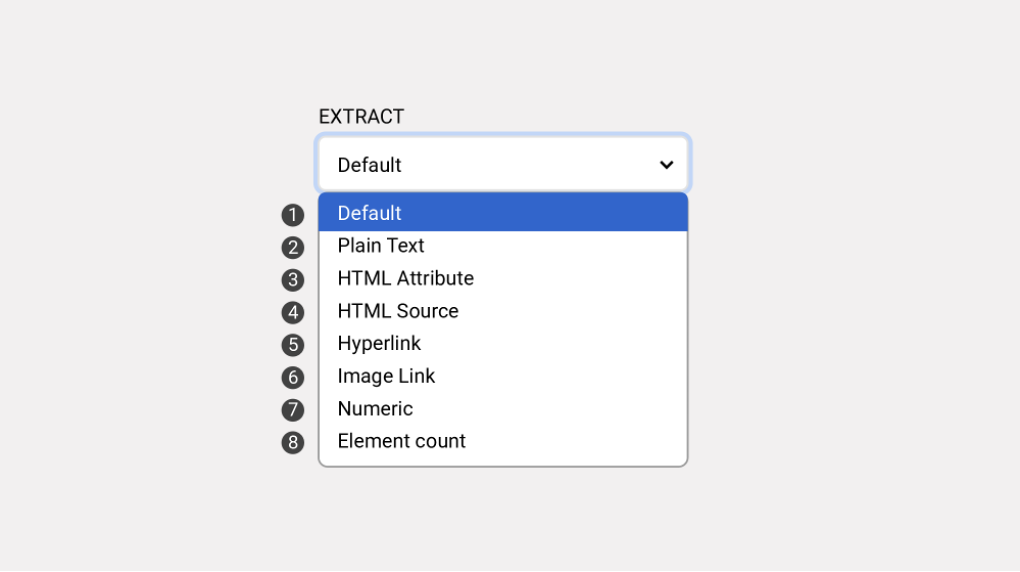
> 部分提取时,可以用部分面板的提取选项详细指定在选择区域提取的数据。
{% stepper %}
{% step %}
### Default(默认值)
原样提取文本、图片 URL、超链接等基本提供信息。大部分情况只用默认值就足够。
{% endstep %}
{% step %}
### Plain Text(纯文本)
只提取文本,不包含链接或图片 URL。
{% hint style="info" %}
示例:选择图片时,无提取值
{% endhint %}
{% endstep %}
{% step %}
### HTML Attribute(HTML 属性)
提取赋予元素的属性(attribute)值。图片路径或商品信息存储在属性时很有用,使用需要基本开发知识。
{% hint style="info" %}
示例:class="style-1", data-id="id-1"
{% endhint %}
{% endstep %}
{% step %}
### HTML Source(HTML 源代码)
原样提取选择元素的 HTML 代码。之后开发者加工源代码时使用。
{% endstep %}
{% step %}
### Hyperlink
只提取挂在文本或图片等的超链接。
{% endstep %}
{% step %}
### Image Link
只提取图片 URL。
{% endstep %}
{% step %}
### Numeric
只提取选择区域内的数字。
{% hint style="info" %}
示例:特别折扣价 5,000 元 → 5,000
{% endhint %}
{% endstep %}
{% step %}
### Element Count
以数字返回选择元素的个数。
{% hint style="info" %}
示例:选择 36 个项目 → 36
{% endhint %}
{% endstep %}
{% endstepper %}
---
# Agent Instructions
This documentation is published with GitBook. GitBook is the documentation platform designed so that both humans and AI agents can read, navigate, and reason over technical content effectively. Learn more at gitbook.com.
## Querying This Documentation
If you need additional information that is not directly available in this page, you can query the documentation dynamically by asking a question.
Perform an HTTP GET request on the current page URL with the `ask` query parameter, and the optional `goal` query parameter:
```
GET https://help.listly.io/docs/zh-hans/getting-started/extension-features/parts-options.md?ask=&goal=
```
`ask` is the immediate question: it should be specific, self-contained, and written in natural language.
`goal` is optional and describes the broader end goal you are ultimately trying to accomplish on behalf of the user. GitBook uses it to tailor the answer towards what is most useful for that goal.
The response will contain a direct answer to the question and relevant excerpts and sources from the documentation.
Use this mechanism when the answer is not explicitly present in the current page, you need clarification or additional context, or you want to retrieve related documentation sections.