# 按网页抓取失败消息的解决方案

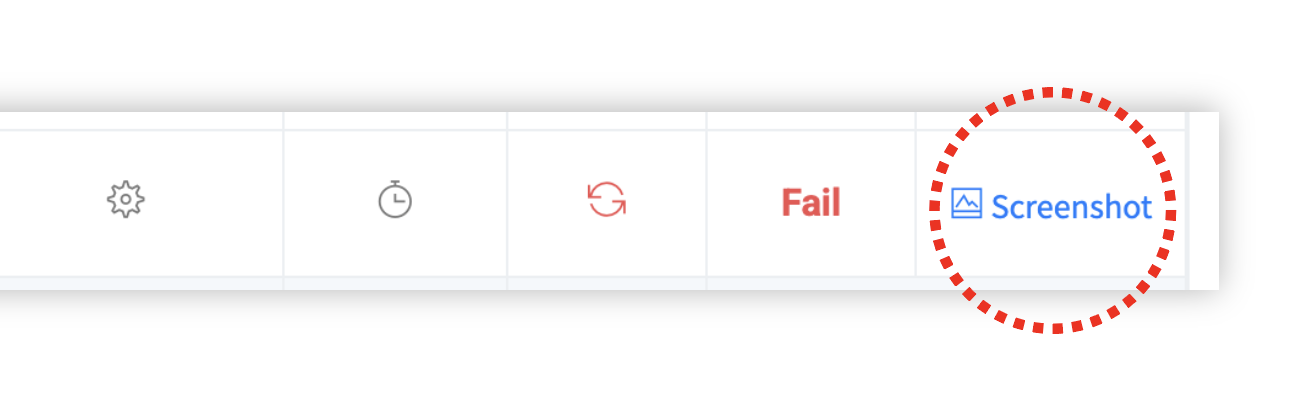
如果提取失败，您可以根据截图中显示的内容确定原因，并获得适当解决方案的指导。按照以下步骤解决问题。

## ✅ 步骤 1. 提取失败后立即检查以下项目

{% stepper %}
{% step %}

### 等待一小段时间并尝试重新提取

可能是由于目标网站的临时加载失败、服务器错误等导致的一次性问题。

→ 间隔几分钟或更长时间后再试。如果重试后相同问题重复出现，请参考步骤 2 中的屏幕类型指南。
{% endstep %}

{% step %}

### 您是否同时运行许多任务？

一次运行多个任务可能会由于处理瓶颈而导致错误。

→ 如果您正在进行批量提取，请尝试减少每个批量任务的 URL 数量。

→ 如果是单个任务（如定时作业），建议错开时间以分散工作负载。
{% endstep %}

{% step %}

### 如果失败重复，请检查错误代码或截图是否已更改

重试时显示的错误代码或截图可能会揭示比之前更具体的原因。

→ 如果代码或屏幕消息已更改，请检查步骤 2 中该情况的指南。
{% endstep %}
{% endstepper %}

***

## ✅ 步骤 2. 请选择错误截图中显示的屏幕类型

<figure><img src="https://content.gitbook.com/content/LlkvcuviCyyU871Augk5/blobs/8WHodtVtRE4Vl1Enb3tA/screenshot.png" alt=""><figcaption></figcaption></figure>

提取失败时，会生成“截图”而非结果。这里显示错误类型和采集器访问目标 URL 时遇到的屏幕，您可以从中推断失败原因。

相同的错误代码可能因截图而有不同的原因，因此首先检查屏幕上的外观最接近以下哪种情况，然后按照该情况的指南操作。

#### 错误截图中屏幕类型的快速链接

<table data-view="cards"><thead><tr><th></th><th data-hidden data-card-cover data-type="image">封面图片</th><th data-hidden data-card-target data-type="content-ref"></th></tr></thead><tbody><tr><td><strong>显示访问被阻止消息。（CAPTCHA、机器人检测、权限检查、无法访问等）</strong></td><td></td><td><a href="https://help.listly.io/docs/zh-hans/~/revisions/kGiwCYgJl2GqNRJ3XmvM/support/solutions-by-extraction-failure-message/xian-shi-fang-wen-bei-zu-zhi-xiao-xi-captcha-ji-qi-ren-jian-ce-quan-xian-jian-cha-wu-fa-fang-wen-den">https://help.listly.io/docs/zh-hans/~/revisions/kGiwCYgJl2GqNRJ3XmvM/support/solutions-by-extraction-failure-message/xian-shi-fang-wen-bei-zu-zhi-xiao-xi-captcha-ji-qi-ren-jian-ce-quan-xian-jian-cha-wu-fa-fang-wen-den</a></td></tr><tr><td><strong>仅显示连接失败消息。</strong></td><td></td><td><a href="https://help.listly.io/docs/zh-hans/~/revisions/kGiwCYgJl2GqNRJ3XmvM/support/solutions-by-extraction-failure-message/jin-xian-shi-lian-jie-shi-bai-xiao-xi">https://help.listly.io/docs/zh-hans/~/revisions/kGiwCYgJl2GqNRJ3XmvM/support/solutions-by-extraction-failure-message/jin-xian-shi-lian-jie-shi-bai-xiao-xi</a></td></tr><tr><td><strong>弹出窗口覆盖提取区域。</strong></td><td></td><td><a href="https://help.listly.io/docs/zh-hans/~/revisions/kGiwCYgJl2GqNRJ3XmvM/support/solutions-by-extraction-failure-message/tan-chu-chuang-kou-fu-gai-ti-qu-qu-yu">https://help.listly.io/docs/zh-hans/~/revisions/kGiwCYgJl2GqNRJ3XmvM/support/solutions-by-extraction-failure-message/tan-chu-chuang-kou-fu-gai-ti-qu-qu-yu</a></td></tr><tr><td><strong>显示登录屏幕。</strong></td><td></td><td><a href="https://help.listly.io/docs/zh-hans/~/revisions/kGiwCYgJl2GqNRJ3XmvM/support/solutions-by-extraction-failure-message/xian-shi-deng-lu-ping-mu">https://help.listly.io/docs/zh-hans/~/revisions/kGiwCYgJl2GqNRJ3XmvM/support/solutions-by-extraction-failure-message/xian-shi-deng-lu-ping-mu</a></td></tr><tr><td><strong>仅显示没有任何内容的空白屏幕。</strong></td><td></td><td><a href="https://help.listly.io/docs/zh-hans/~/revisions/kGiwCYgJl2GqNRJ3XmvM/support/solutions-by-extraction-failure-message/jin-xian-shi-mei-you-ren-he-nei-rong-de-kong-bai-ping-mu">https://help.listly.io/docs/zh-hans/~/revisions/kGiwCYgJl2GqNRJ3XmvM/support/solutions-by-extraction-failure-message/jin-xian-shi-mei-you-ren-he-nei-rong-de-kong-bai-ping-mu</a></td></tr><tr><td><strong>仅主要内容不可见。</strong></td><td></td><td><a href="https://help.listly.io/docs/zh-hans/~/revisions/kGiwCYgJl2GqNRJ3XmvM/support/solutions-by-extraction-failure-message/jin-zhu-yao-nei-rong-bu-ke-jian">https://help.listly.io/docs/zh-hans/~/revisions/kGiwCYgJl2GqNRJ3XmvM/support/solutions-by-extraction-failure-message/jin-zhu-yao-nei-rong-bu-ke-jian</a></td></tr><tr><td><strong>页面显示为空白。</strong></td><td></td><td><a href="https://help.listly.io/docs/zh-hans/~/revisions/kGiwCYgJl2GqNRJ3XmvM/support/solutions-by-extraction-failure-message/ye-mian-xian-shi-wei-kong-bai">https://help.listly.io/docs/zh-hans/~/revisions/kGiwCYgJl2GqNRJ3XmvM/support/solutions-by-extraction-failure-message/ye-mian-xian-shi-wei-kong-bai</a></td></tr><tr><td><strong>[批量提取] 显示正常但无问题的屏幕。</strong></td><td></td><td><a href="https://help.listly.io/docs/zh-hans/~/revisions/kGiwCYgJl2GqNRJ3XmvM/support/solutions-by-extraction-failure-message/pi-liang-ti-qu-xian-shi-zheng-chang-dan-wu-wen-ti-de-ping-mu">https://help.listly.io/docs/zh-hans/~/revisions/kGiwCYgJl2GqNRJ3XmvM/support/solutions-by-extraction-failure-message/pi-liang-ti-qu-xian-shi-zheng-chang-dan-wu-wen-ti-de-ping-mu</a></td></tr><tr><td><strong>[定时提取] 显示正常但无问题的屏幕。</strong></td><td></td><td><a href="https://help.listly.io/docs/zh-hans/~/revisions/kGiwCYgJl2GqNRJ3XmvM/support/solutions-by-extraction-failure-message/ding-shi-ti-qu-xian-shi-zheng-chang-dan-wu-wen-ti-de-ping-mu">https://help.listly.io/docs/zh-hans/~/revisions/kGiwCYgJl2GqNRJ3XmvM/support/solutions-by-extraction-failure-message/ding-shi-ti-qu-xian-shi-zheng-chang-dan-wu-wen-ti-de-ping-mu</a></td></tr><tr><td><strong>错误代码 - TimeOutException、TimeLimitExceeded</strong></td><td></td><td><a href="https://help.listly.io/docs/zh-hans/~/revisions/kGiwCYgJl2GqNRJ3XmvM/support/solutions-by-extraction-failure-message/cuo-wu-dai-ma-timeoutexceptiontimelimitexceeded">https://help.listly.io/docs/zh-hans/~/revisions/kGiwCYgJl2GqNRJ3XmvM/support/solutions-by-extraction-failure-message/cuo-wu-dai-ma-timeoutexceptiontimelimitexceeded</a></td></tr><tr><td><strong>错误代码 - AutoClickError</strong></td><td></td><td><a href="https://help.listly.io/docs/zh-hans/~/revisions/kGiwCYgJl2GqNRJ3XmvM/support/solutions-by-extraction-failure-message/cuo-wu-dai-ma-autoclickerror">https://help.listly.io/docs/zh-hans/~/revisions/kGiwCYgJl2GqNRJ3XmvM/support/solutions-by-extraction-failure-message/cuo-wu-dai-ma-autoclickerror</a></td></tr><tr><td><strong>错误代码 - ActionScriptError、ScriptError</strong></td><td></td><td><a href="https://help.listly.io/docs/zh-hans/~/revisions/kGiwCYgJl2GqNRJ3XmvM/support/solutions-by-extraction-failure-message/cuo-wu-dai-ma-actionscripterrorscripterror">https://help.listly.io/docs/zh-hans/~/revisions/kGiwCYgJl2GqNRJ3XmvM/support/solutions-by-extraction-failure-message/cuo-wu-dai-ma-actionscripterrorscripterror</a></td></tr></tbody></table>

***

## ✅ 步骤 3. 如果以上项目都不适用？

如果没有适用的项目，或者仅从错误截图难以准确确定原因，请通过 <hello@listly.io> 联系我们。

联系我们时包含以下信息将允许更快、更顺畅的支持：

* 请提供数据板失败屏的 URL。如果是批量提取，您可以改为提供批量提取结果屏的 URL。
* 请截取并发送直接访问目标网页时出现的屏幕。由于用户的访问环境（国家设置、登录状态等）可能与我们的不同，请在截取的图像上标记（框、箭头、注释等）您试图收集哪个位置的数据（元素/区域），以便我们可以更准确地检查。


---

# Agent Instructions: Querying This Documentation

If you need additional information that is not directly available in this page, you can query the documentation dynamically by asking a question.

Perform an HTTP GET request on the current page URL with the `ask` query parameter:

```
GET https://help.listly.io/docs/zh-hans/support/solutions-by-extraction-failure-message.md?ask=<question>
```

The question should be specific, self-contained, and written in natural language.
The response will contain a direct answer to the question and relevant excerpts and sources from the documentation.

Use this mechanism when the answer is not explicitly present in the current page, you need clarification or additional context, or you want to retrieve related documentation sections.