> For the complete documentation index, see [llms.txt](https://help.listly.io/llms.txt). Markdown versions of documentation pages are available by appending `.md` to page URLs; this page is available as [Markdown](https://help.listly.io/docs/zh-hant/getting-started/extension-features-zh-hant/parts-selection-zh-hant.md).
# 部分擷取範圍選取
{% hint style="success" %}
[**什麼是部分擷取(Extract Part)?**](https://help.listly.io/docs/zh-hant/~/revisions/3b27uboHDyYmyfrIQNvt/getting-started/extension-features-zh-hant/parts-zh-hant)
這是可以**只選取想要的區塊、部分擷取資料**的功能。當您想提升擷取資料的結構與準確度時,歡迎試試看。
{% endhint %}
## 使用方法
{% stepper %}
{% step %}
## 逐一選取想要的區塊
使用部分擷取(Extract Part),您可以選取多個資料區塊並一次全部擷取。
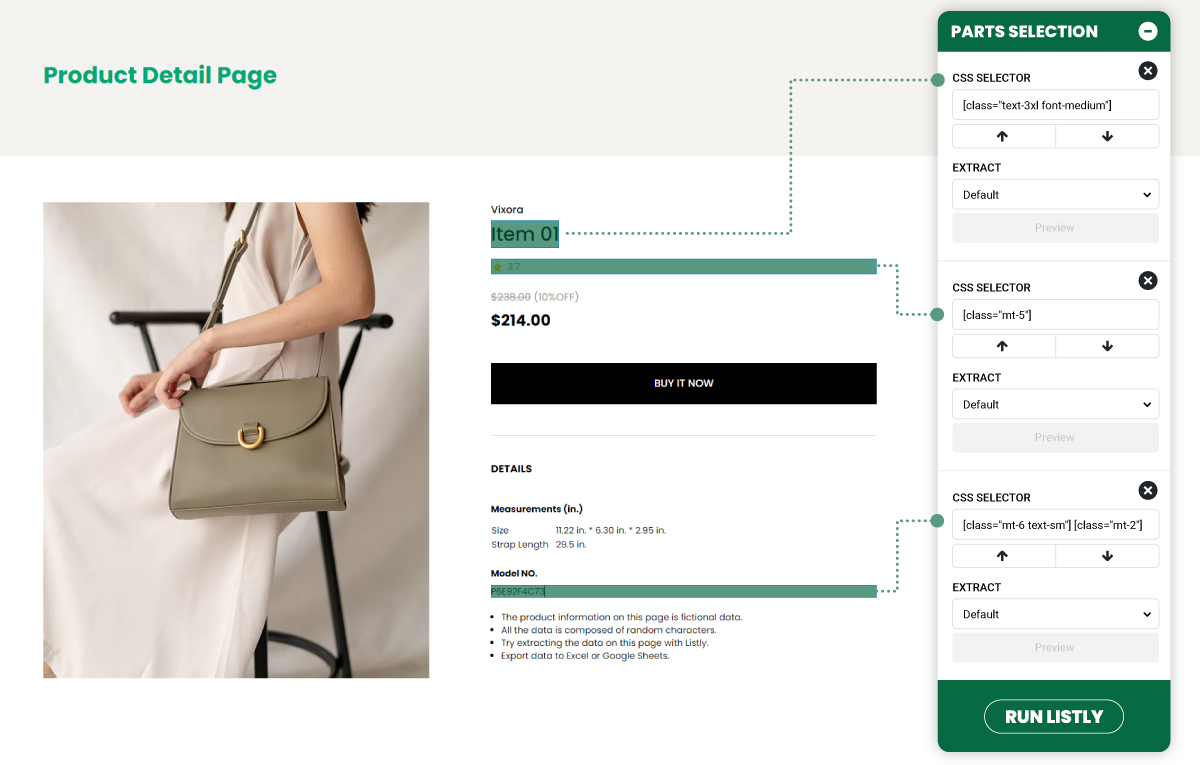
如下方範例所示,點擊您需要的各個部分——商品名稱、評論、價格、型號等——每個選取的區塊都會分別登錄到面板中。點擊 **\[擷取]** 按鈕後,所有選取的區塊就會同時擷取。
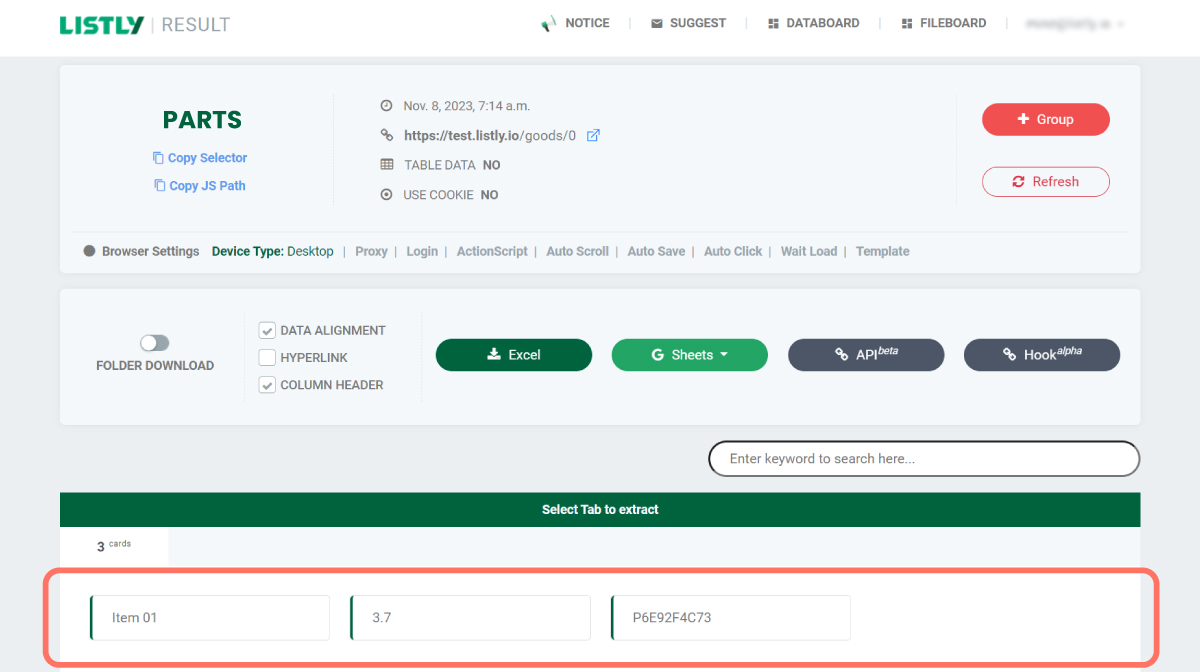
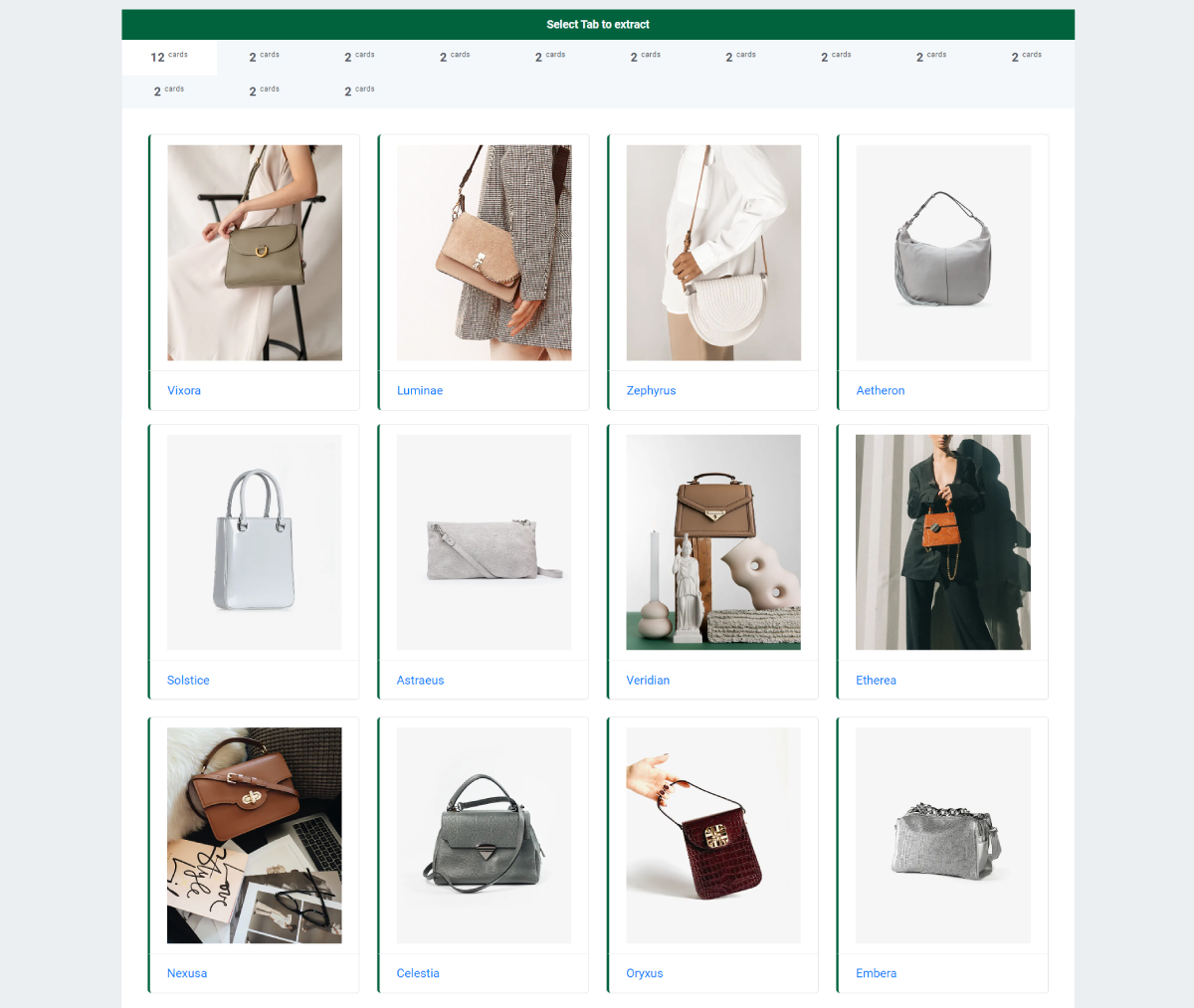
以這種方式選取並擷取時,可以看到每個個別選取區塊的資訊會如下圖所示被擷取出來。
{% endstep %}
{% step %}
## 一次選取重複區塊(自動選取重複元素)
**只要點擊一次,就能自動選取重複的區塊。**
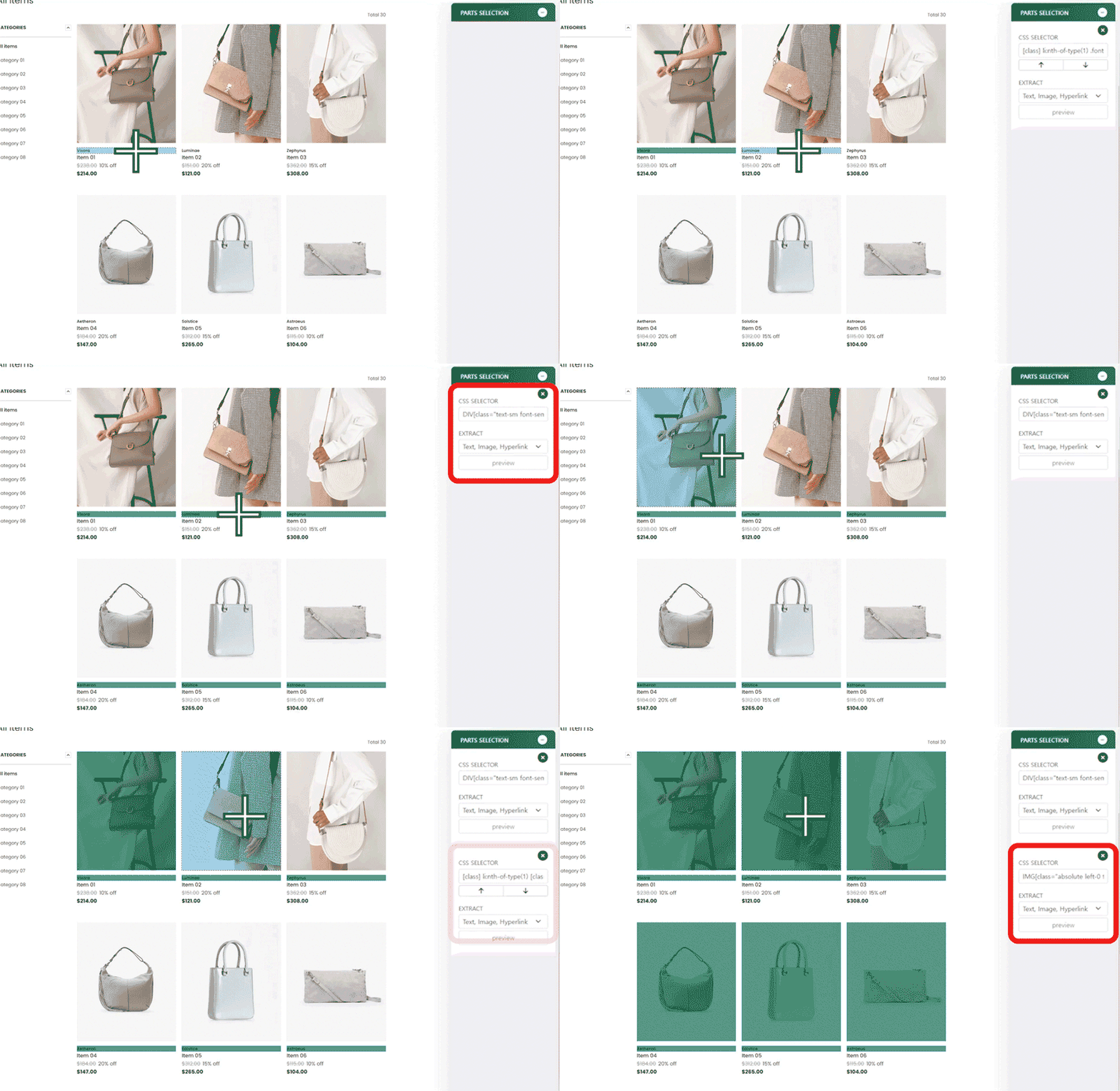
如下方範例所示,點擊網頁上的特定元素,接著點擊與第一個元素重複的元素,Listly 便會辨識相似的區塊並出現彈出視窗。此時,請點擊 **合併為一組(Group All)** 按鈕。
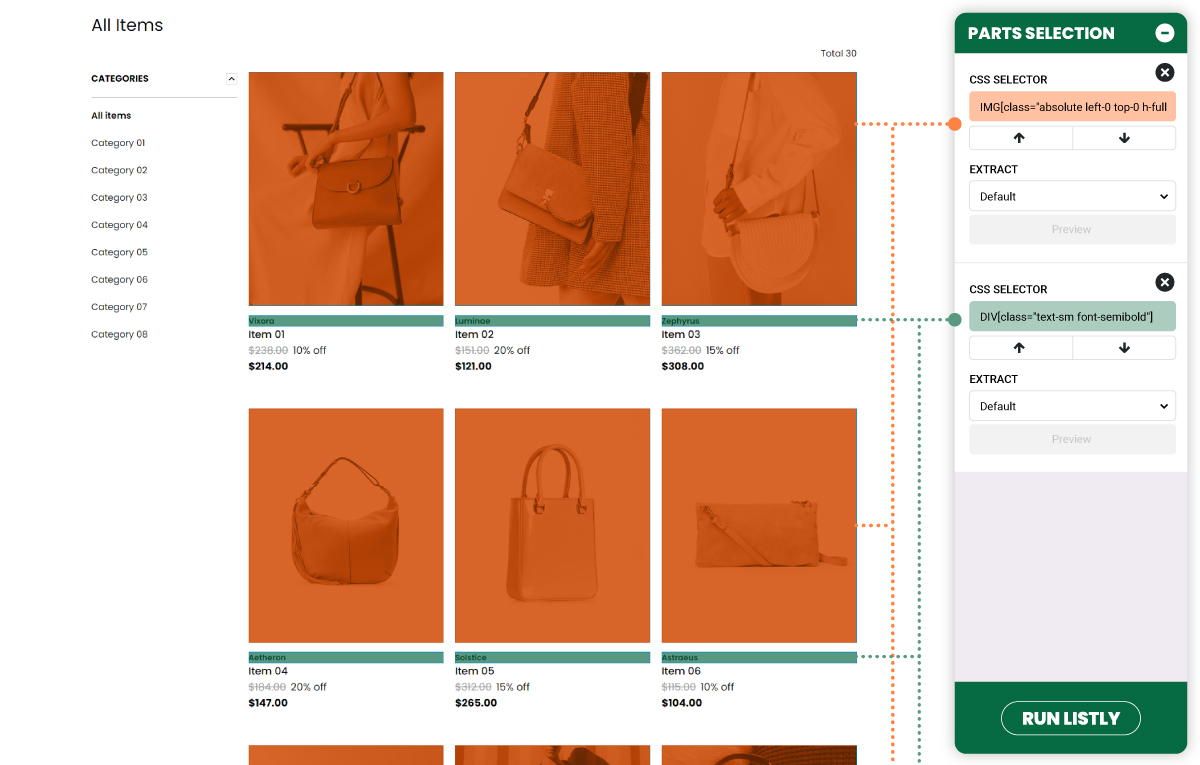
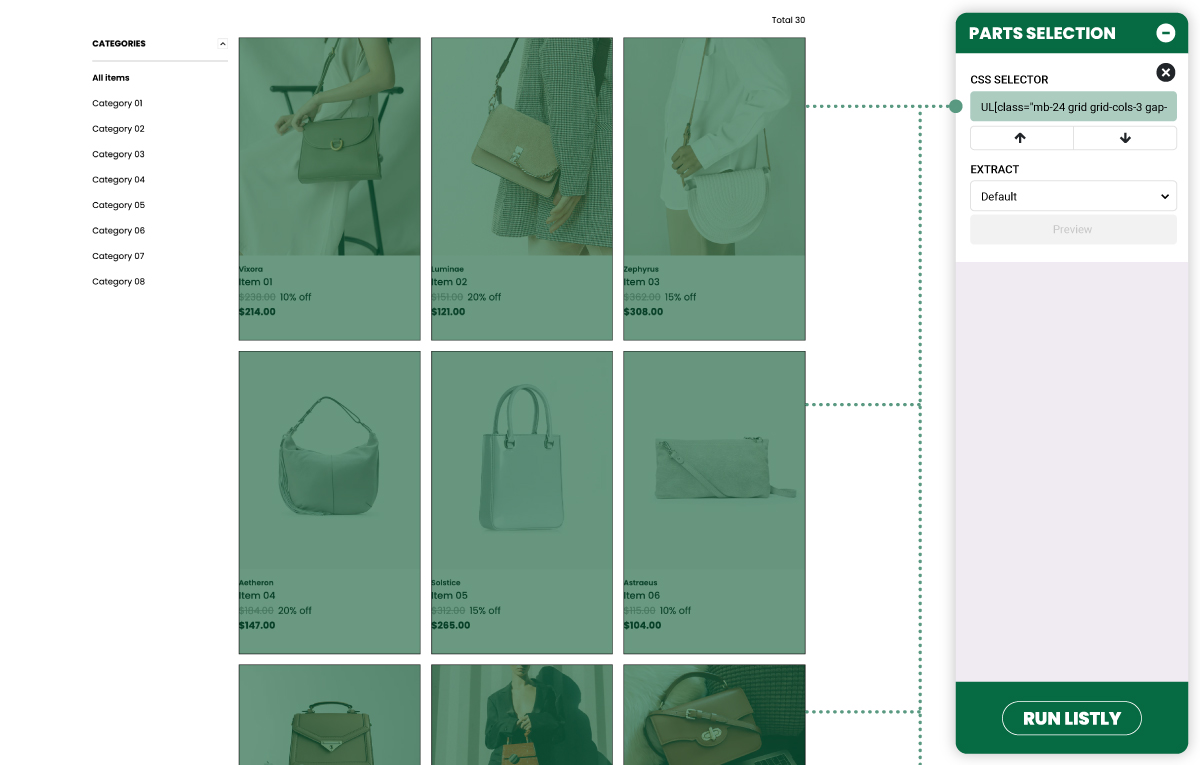
**具有相同階層結構的元素會被辨識為單一區塊,並記錄在側邊面板中,如下所示。** (圖片中以不同顏色呈現,以便理解。)
以「一次選取重複區塊」的方式選取想要的區塊後,點擊擷取按鈕即可如下所示擷取資料。您也可以輕鬆彙整同一頁面內重複出現的圖片與品牌名稱。
{% endstep %}
{% step %}
## 自動選取重複元素(以項目框為單位選取)
您也可以用項目框為單位自動選取重複元素。選取第一個框,再選取連續的第二個框時,即可一次選取所有具有相同結構的項目。
\*\*若您想以項目為單位這樣選取,\*\*當偵測到您所選兩個區塊之間有相似模式而出現彈出視窗時,請確認 **「以項目為單位選取(Select by item)」** 已啟用,再點擊 **「合併為一組(Group All)」**。
如上圖所示,啟用此切換開關後,可以看到選取範圍的虛線框會擴展至項目層級。
{% endstep %}
{% endstepper %}
{% hint style="success" %}
[**什麼是 PARTS 擷取?**](https://help.listly.io/docs/zh-hant/~/revisions/1Y8YuKBoP5NixSQ7UEOx/getting-started/extension-features-zh-hant/parts-zh-hant)
**選擇想要的區域進行部分資料擷取**的功能。當您想提高擷取資料的排列和準確度時,請使用此功能。
{% endhint %}
## 使用方法
{% stepper %}
{% step %}
#### 個別選擇想要的區域
在 PARTS 擷取中,您可以選擇多個想要的資料擷取區域,一次擷取所有資料。
如下方範例所示,分別點擊商品名稱、評論、價格、型號等需要的部分,所選區域會分別記錄在面板中。之後點擊 **\[執行 Listly]** 按鈕,就可以同時擷取所有選取的區域。
如範例圖片所示進行選擇和擷取後,您可以確認個別選取區域的資訊如下圖所示被擷取出來。
{% endstep %}
{% step %}
#### 同時選取重複區域(自動選取重複元素)
**只需點擊一次,就能自動選取重複的區域。**
如下方範例所示,在網頁上點擊特定元素,然後點擊與第一個元素重複的元素,頁面內所有具有相同層次結構的資料就會自動被選取。
**如下所示,相同的層次結構會被識別為一個區域並記錄在側邊面板中。**(圖片為了方便理解而使用不同顏色表示。)
使用「同時選取重複區域」方式選擇想要的區域後,點擊擷取按鈕即可如下所示擷取資料。也可以輕鬆收集頁面內重複出現的圖片和品牌名稱。
{% endstep %}
{% step %}
#### 自動選取重複元素(以項目區塊為單位選擇)
也可以以項目區塊為單位自動選取重複元素。選擇第一個區塊,然後選擇連續的第二個區塊,就能一次選取所有具有相同結構的項目。**但是,這種情況下擷取結果的準確度可能相對較低,因此建議「以最大項目為單位」進行選擇。**
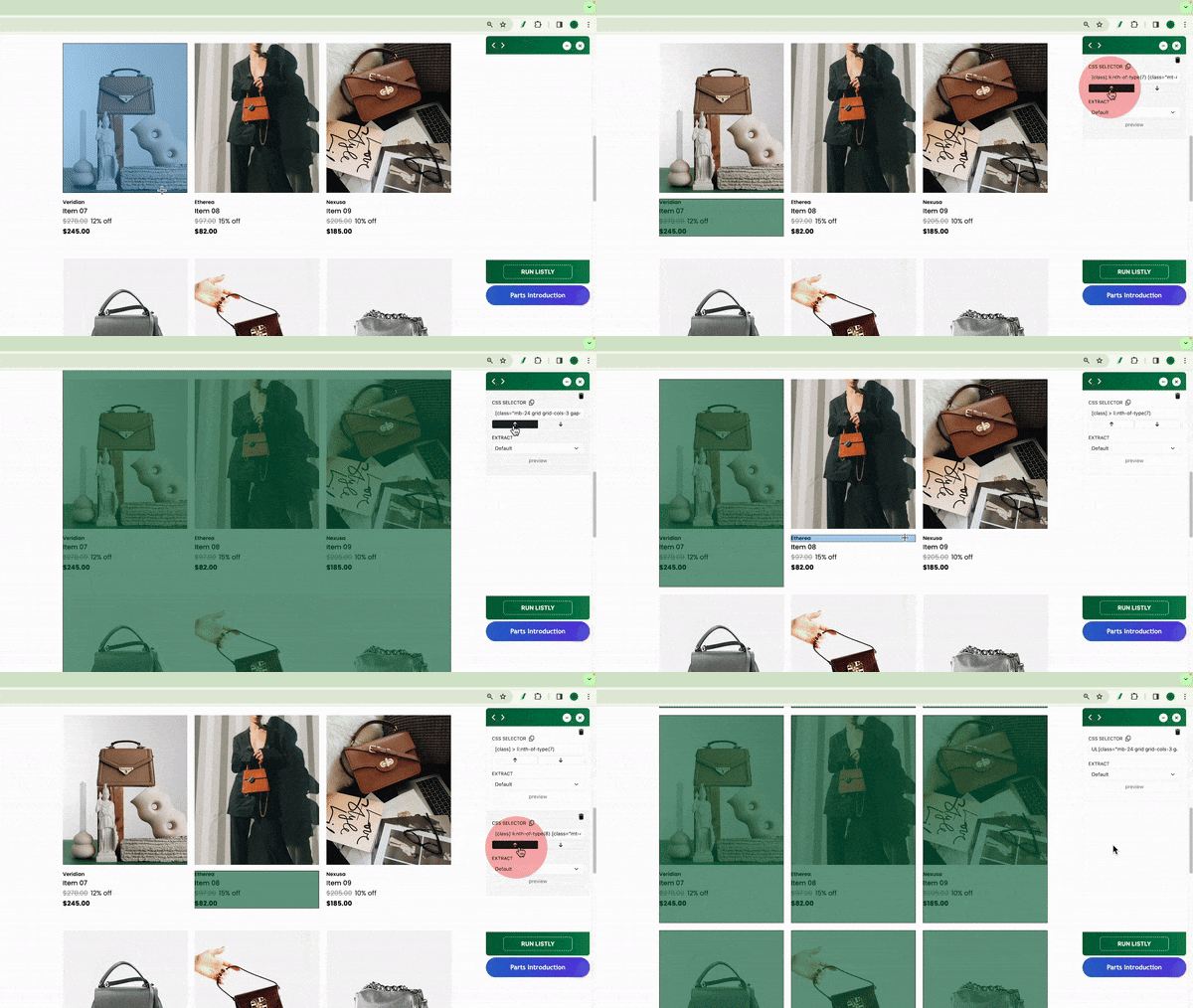
在特定項目區塊內選擇細部元素(文字、圖片等)後, 持續點擊 ⬆︎ 向上箭頭,選取區域會逐漸擴大,甚至可以擴展到比項目區塊更大的整體區塊。
在此狀態下再點擊一次 ⬇︎ 向下箭頭,就可以指定「最大項目區塊單位」。
在其他項目上也使用相同方式指定「最大項目單位」,就可以自動選取網頁內所有具有相同結構的項目。
{% endstep %}
{% endstepper %}
---
# Agent Instructions
This documentation is published with GitBook. GitBook is the documentation platform designed so that both humans and AI agents can read, navigate, and reason over technical content effectively. Learn more at gitbook.com.
## Querying This Documentation
If you need additional information that is not directly available in this page, you can query the documentation dynamically by asking a question.
Perform an HTTP GET request on the current page URL with the `ask` query parameter, and the optional `goal` query parameter:
```
GET https://help.listly.io/docs/zh-hant/getting-started/extension-features-zh-hant/parts-selection-zh-hant.md?ask=&goal=
```
`ask` is the immediate question: it should be specific, self-contained, and written in natural language.
`goal` is optional and describes the broader end goal you are ultimately trying to accomplish on behalf of the user. GitBook uses it to tailor the answer towards what is most useful for that goal.
The response will contain a direct answer to the question and relevant excerpts and sources from the documentation.
Use this mechanism when the answer is not explicitly present in the current page, you need clarification or additional context, or you want to retrieve related documentation sections.