> For the complete documentation index, see [llms.txt](https://help.listly.io/llms.txt). Markdown versions of documentation pages are available by appending `.md` to page URLs; this page is available as [Markdown](https://help.listly.io/getting-started/result-page-features/data-arrangement.md).
# Data Layout
## What is the Data Layout Option?
The data arrangement option is **a feature you can set when extracting multiple pages at once (group extraction, tabs extraction, etc.) and exporting them to a single file**. Depending on how you'll use the data, you can choose whether to arrange individual page results by card or by tab.
{% hint style="info" %}
Data layout is one of \[Download Options] and **has nothing to do with usage**. Feel free to select both ways and choose the one that gives you the results you want.
{% endhint %}
***
## Understanding Cards vs Tabs
* **Card**: A data unit area discovered by Listly. One card is saved as **one Excel row**. For a single task, if you download the above result as is, 30 cards means 30 rows in Excel.
* **Tab**: The upper section containing multiple cards.
These concepts apply to each task and are used as data arrangement standards when results from multiple URLs are combined, like group extraction or tabs extraction.
***
## Examples
{% stepper %}
{% step %}
#### Vertical
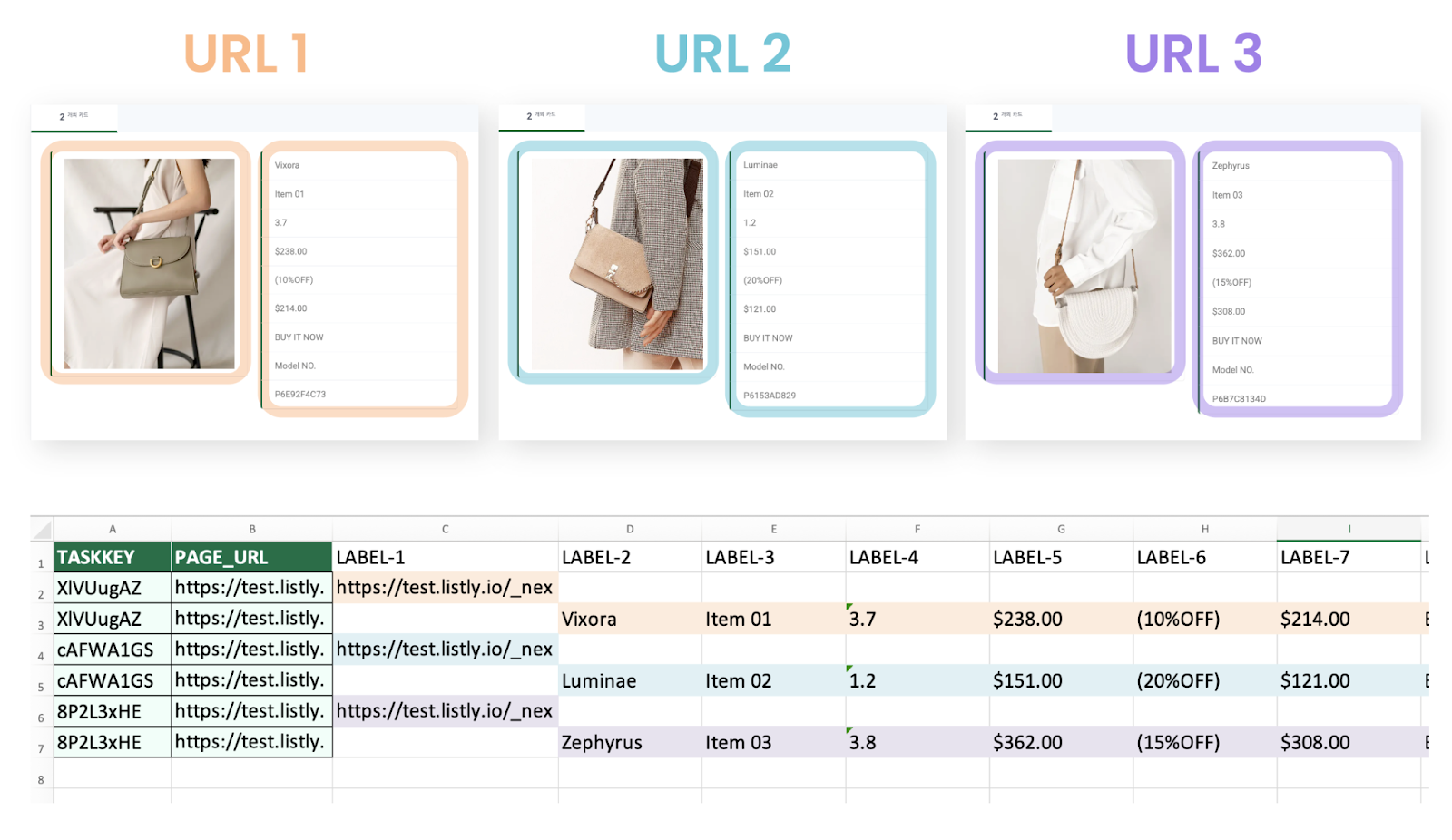
If each URL's selected data tab had **2 cards**, extracting 3 URLs creates a total of **6 rows (2×3) of data**.\
In other words, **each card is recorded as an independent row**, making it suitable for cases like shopping mall 'list pages' where **multiple item info is contained** within one tab.
{% endstep %}
{% step %}
#### Horizontal
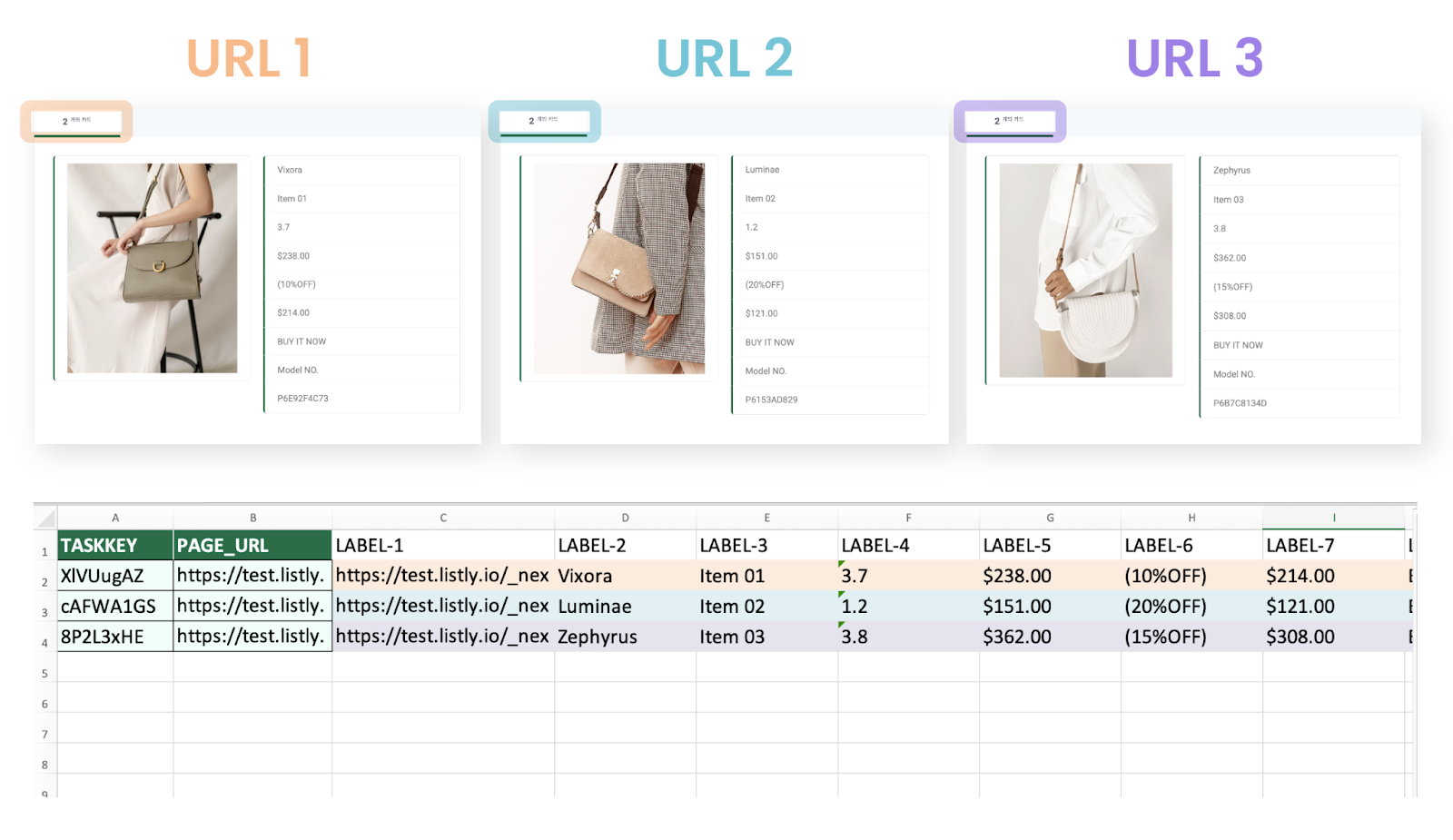
All cards within each URL's data tab are placed in one row. Therefore, extracting 3 URLs with this option creates only **3 rows** total in the final Excel file, matching the number of URLs.
In other words, **each page is recorded as one Excel row**, making it suitable for cases like shopping mall 'detail pages' where there's only one item's info within one tab.
{% endstep %}
{% endstepper %}
---
# Agent Instructions
This documentation is published with GitBook. GitBook is the documentation platform designed so that both humans and AI agents can read, navigate, and reason over technical content effectively. Learn more at gitbook.com.
## Querying This Documentation
If you need additional information that is not directly available in this page, you can query the documentation dynamically by asking a question.
Perform an HTTP GET request on the current page URL with the `ask` query parameter, and the optional `goal` query parameter:
```
GET https://help.listly.io/getting-started/result-page-features/data-arrangement.md?ask=&goal=
```
`ask` is the immediate question: it should be specific, self-contained, and written in natural language.
`goal` is optional and describes the broader end goal you are ultimately trying to accomplish on behalf of the user. GitBook uses it to tailor the answer towards what is most useful for that goal.
The response will contain a direct answer to the question and relevant excerpts and sources from the documentation.
Use this mechanism when the answer is not explicitly present in the current page, you need clarification or additional context, or you want to retrieve related documentation sections.