
Parts Options
Extract data by selecting only specific areas you want. Use this when you want to improve the arrangement and accuracy of extracted data.
During Parts extraction, you can use extraction options in the Parts panel to specify exactly what data to extract from the selected area.
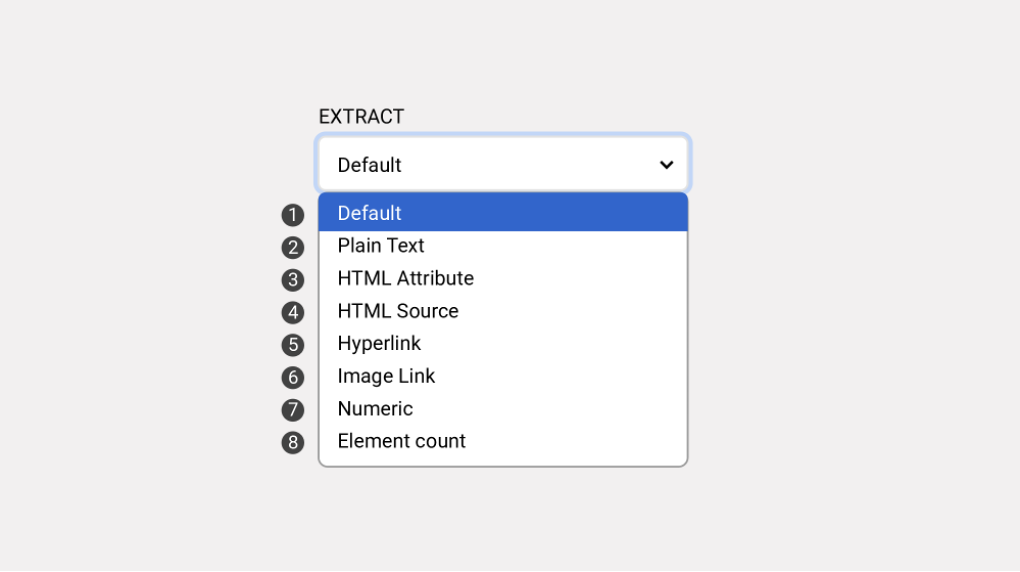
Extraction Options
➊ Default: Extracts provided information as-is, including text, image URLs, hyperlinks, etc. The default option is sufficient for most cases.
➋ Plain Text: Extracts text only, excluding links or image URLs.
e.g. No extraction value when selecting images
➌ HTML Attribute: Extracts values from element attributes. Useful when image paths or product information are stored in attributes. Requires basic development knowledge to use effectively.
e.g. class="style-1", data-id="id-1"
➍ HTML Source: Extracts the selected element's HTML code as-is. Used when developers need to process the source later.
➎ Hyperlink: Extracts only hyperlinks attached to text or images.
➏ Image Link: Extracts only image URLs.
❼ Numeric: Extracts only numbers from the selected area.
e.g. Special discount price 5,000 KRW → 5,000
❽ Element Count: Returns the number of selected elements as a number.
e.g. 36 items selected → 36
Last updated
Was this helpful?